Bootstrapping a Partition
Out-Of-Band-Network
To be able to deploy and maintain a metal-stack partition, you need to bootstrap the Out-Of-Band-Network first. Some considerations must be made to fulfill the requirements of our infrastructure, a partition is designed to be:
- secure
- fully routable (BGP)
- scalable
- resilient
- deployable via CI/CD jobs
- accessible from the internet from specific IPs
In order to accomplish this task remotely and in a nearly automatic manner, you have to bootstrap the components in this order:
- management firewalls
- management servers
- management spines
- management leaves
- leaves, spines and exits
This document assumes that all cabling is done. Here is a quick overview of the architecture:
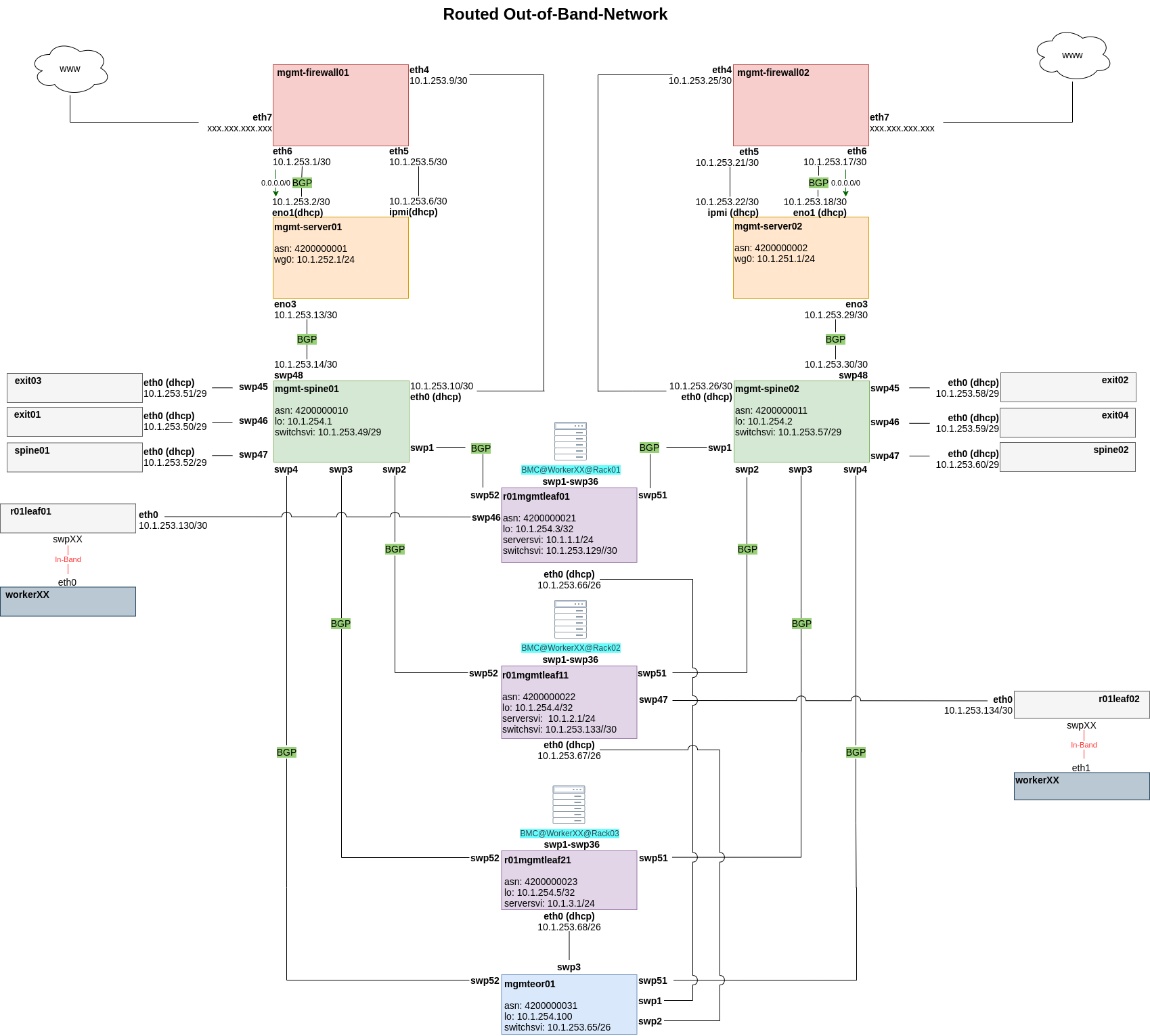
Management Firewalls
As you can see, the management firewalls are the first bastion hosts in a partition to provide access to our infrastructure. There are two of them in each partition to guarantee high availability and load balancing. The very first configuration of these routers has to be done manually to solve the chicken and egg problem that you need the management firewalls in place to deploy the partition. Manually means that we generate a configuration template with ansible that we deploy with copy/paste, and the load, through the machine console. Once the management server has been deployed, we are able to deploy this configuration via CI runner and ansible. For this you need the user and the ssh-key, which is deployed with the configuration file mentioned above. The Edgerouters has to fulfill some requirements including:
- provide and restrict access to the Out-Of-Band-Network from the internet with a firewall ruleset
- provide destination NAT to the management server and its IPMI interface
- provide Onie Boot and ztp via DHCP options for the management spine
- provide DHCP management addresses for management spine, management server and ipmi interface of the management server
- Hairpin-NAT for the management server to access itself via its public IP, needed by the CI runner to delegate CI Jobs.
- propagate a default gateway via BGP
Management Servers
The second bastion hosts are the management servers. They are the main bootstrapping components of the Out-Of-Band-Network. They also act as jump hosts for all components in a partition. Once they are installed and deployed, we are able to bootstrap all the other components. To bootstrap the management servers, we generate an ISO image which will automatically install an OS and an ansible user with ssh keys. It is preconfigured with a preseed file to allow an unattended OS installation for our needs. This is why we need remote access to the IPMI interface of the management servers: The generated ISO is attached via the virtual media function of the BMC. After that, all we have to do is boot from that virtual CD-ROM and wait for the installation to finish. Deployment jobs (Gitlab-CI) in a partition are delegated to the appropriate management servers, therefore we need a CI runner active on each management server.
After the CI runner has been installed, you can trigger your Playbooks from the the CI. The Ansible-Playbooks have to make sure that these functionalities are present on the management servers:
- Prometheus and exporters
- CI runner
- metal-bmc
- image-cache
- simple webserver to provide images
- Onie Boot and ZTP
- DHCP addresses for ipmi interfaces of the workers
- DHCP addresses for switches
Management Spines
If you are using SONiC switches, you should make use of Zero Touch Provisioning and Onie Boot
The purpose of these switches is to connect the management interfaces of all switches to the management servers. The management spine's own management interface is connected to the management firewall for the bootstrapping of the management spine itself. The management firewall will provide a DHCP address and DHCP options to start SONiC's Zero Touch Provisioning; the images for all switches are downloaded from the management server (nginx container). Each management leaf is connected to both management spines to provide redundant connectivity to both management servers. BGP is used as a routing protocol such that, when a link goes down, an alternate path is used. In the picture above you can see that there are also switch management interfaces connected to the management spine. This has to be done so that we can bootstrap these switches; the management spine relays the DHCP requests from these switches to the management servers so that they are able to Onie Boot and get their ZTP scripts.
Management Leaves
All workers have to be connected with their IPMI/BMC interface to the management leaves to get DHCP addresses from the management server. The management leaves are relaying those DHCP requests to the management server which will answer the requests and provide IPs from a given range. The management interfaces of the management leaves also have to be reachable from the management server, and need to get their IP address via DHCP for the bootstrapping process.
In the example setup, these interfaces are connected to an end-of-row-switch which aggregates them and connects them to the management spines with a fiber-optics connection. If you can reach the management spines from the management leaves with copper cables, you do not need the end of row switch. After the initial bootstrapping, the management interfaces of the management leaves continue to be used for access to the switches' command line, and for subsequent OS updates. (update=reset+bootrap+deployment)