Partition Deployment
A partition is the data center infrastructure layer — the physical servers, switches, firewalls and their networks that metal-stack manages. See the architecture overview for the full component breakdown and design principles.
This section continues from the Control Plane deployment and covers how to deploy the required infrastructure services and how to connect your partition to the control plane, using the metal-stack partition Ansible roles. It is assumed that all cabling is done.
During this section, our repository will grow to look something like the following:
.
├── deploy_mgmt_servers.yaml        # management server services
├── deploy_mgmt_switches.yaml       # mgmtleaves and mgmtspines SONiC
├── deploy_spines_exits.yaml        # spine/exit switch SONiC
├── deploy_leaves.yaml              # leaf switch SONiC + metal-core
├── inventory
│   ├── inventory.yaml              # all partition host groups
│   ├── host_vars
│   └── group_vars
│       ├── all/
│       │   ├── release_vector.yaml
│       │   └── metal-stack/
│       │       ├── partition.yaml    # partition → control plane connection
│       │       └── control-plane.yaml # vault-encrypted: API keys, BMC passwords
│       ├── mgmtservers/
│       │   ├── common.yaml
│       ├── mgmtspines/
│       │   ├── common.yaml
│       │   ├── metal-bmc.yaml
│       ├── mgmtleaves/
│       │   ├── common.yaml
│       ├── exits/
│       │   ├── common.yaml
│       │   └── sonic.yaml
│       ├── spines/
│       │   ├── common.yaml
│       │   └── sonic.yaml
│       ├── leaves/
│       │   ├── common.yaml
│       │   ├── sonic.yaml
│       │   └── metal-core.yaml
│       └── partition/
│           └── common.yaml
└── .github/
    └── workflows/
        └── deploy-partition.yaml     # CI/CD for partition
Out-Of-Band-Network
The first step of deploying a partition is to deploy the Out-Of-Band-Network. It provides a dedicated management network that remains accessible even when the production network is down or unconfigured. It is the foundation that enables remote bootstrapping, monitoring, and maintenance of all partition hardware — from leaf and spine switches to bare-metal servers via their BMC/IPMI interfaces.
The partition networking is designed to be secure, fully routable via BGP, scalable, resilient, deployable through CI/CD, and selectively accessible from the internet. To deploy a partition and its networking stack remotely and in a nearly automatic manner, some components must be initially bootstrapped manually:
- the management firewalls, management servers, management spines and management leaves need to be configured
- a CI/CD-Runner of your choice needs to be installed to run the automated deployments.
The result should look something like the following image, but could vary for different deployments.
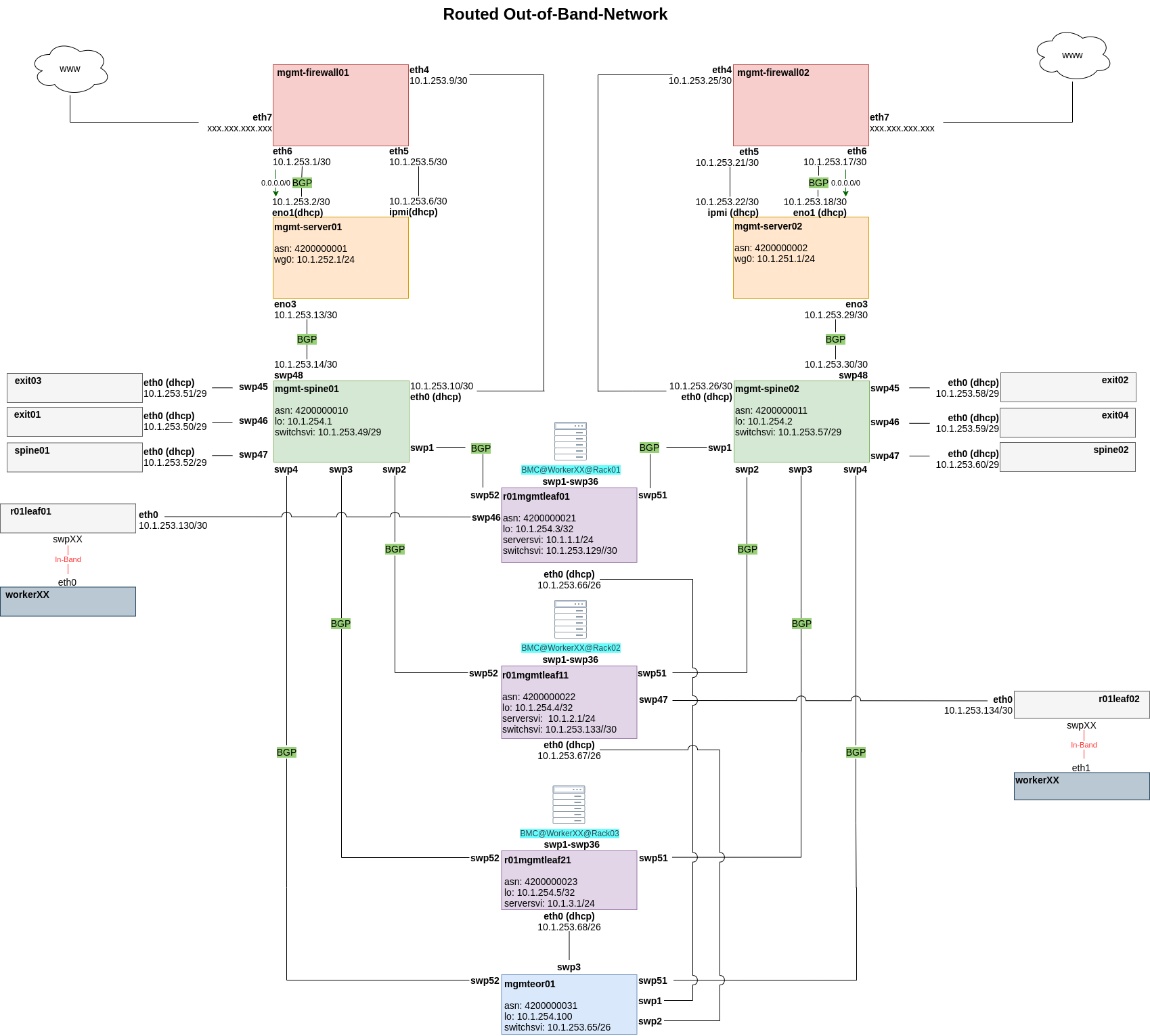
The following subsections provide a suggestion, how the Out-Of-Band-Network could be deployed. Please note that this is only a suggestion — we cannot provide an out-of-the-box solution, as hardware setups and environments differ significantly between deployments. After bootstrapping the OOB network, we make use of the CI/CD workers to deploy as much of the required software via Ansible.
Management Firewalls
Management firewalls are the first bastion hosts in a partition, providing the only controlled entry point to the Out-Of-Band-Network from the internet. Each partition should run two firewalls for high availability and load balancing.
As there is no CI/CD runner yet, the initial configuration of these routers must be done manually. This is due to the chicken-and-egg problem of partition deployment, since the firewalls and management servers themselves are needed to automate the rest of the partition. Once the management server is also in place, all subsequent configurations can be deployed automatically via runner and Ansible.
Due to the differing environments and used hardware, we can only give inspiration how the configuration of a management firewall could look like. There is a mgmt-firewall role that can give you an idea, how to set it up.
You can adapt the role, create a configuration template with Ansible and for once deploy it manually via copy/paste through the machine console. The next step is to add the SSH keys and user credentials to enable an automated workflow later.
The firewalls (EdgeRouters) must fulfill the following requirements:
- Provide and restrict access to the Out-Of-Band-Network from the internet via firewall rulesets
- Provide destination NAT to the management server and its IPMI interface
- Provide DHCP options for ONIE Boot and ZTP of the management spine
- Provide DHCP management addresses for the management spine, management server, and IPMI interfaces
- Perform Hairpin-NAT so the management server can access itself via its public IP (required by the CI runner to delegate jobs)
- Propagate a default gateway via BGP
Management Servers
Management servers are the main bootstrapping components of the Out-Of-Band-Network and serve as jump hosts for all partition components. Once they are installed, every other component can be deployed automatically. For our high-availability setup, there are again two of them, each connected to their management-firewall.
Bootstrapping the management servers requires remote IPMI access and a way to perform an unattended OS installation with an Ansible user and SSH keys pre-configured. The exact approach depends on your hardware, existing infrastructure, and preferred automation tools. Below are two common examples, but any solultion is fine.
Preconfigured ISO with preseed — generate an ISO with a preseed file that installs an OS and an Ansible user, then attach it via the BMC's virtual media function.
PXE boot with cloud-init — serve a minimal boot image over the network and provide a cloud-init user-data file for first-boot configuration.
Again we need a minimal installation and guarantee networking and remote access.
After installation, a CI runner needs to be installed on each management server. Deployment jobs (GitHub Actions or GitLab CI) are delegated to these runners, which trigger Ansible playbooks to provision the following services on the management servers:
- CI runner for job delegation
metal-bmcfor bare-metal lifecycle management- Image cache and a simple webserver to serve OS images for
ONIEandZTPscripts - DHCP server for worker IPMI interfaces and switch management interfaces
The mgmt-server role can be used as a template for the initial setup and also to install some of the required services.
The runner on the management server needs:
- An SSH key pair for Ansible authentication
— The public key in each switch's
authorized_keys(this can be achieved via theZTPscripts) - CI/CD secrets or any kind of access to the Ansible Vault password and private key
Spine & Exit Management Switches (Management Spines)
Management spines connect the management interfaces of all spine and exit switches to the management servers to enable out-of-band management. The spine's own management interfaces connects to the according management firewall, which provides a DHCP address and options to trigger SONiC's Zero Touch Provisioning. Switch images are then downloaded from the management server's webserver.
Each management leaf connects to both management spines for redundant connectivity. BGP is used as the routing protocol, so if a link fails traffic automatically switches to the alternate path.
The management spine also relays DHCP requests from switch management interfaces (leaves, spines, exits, and workers) to the management servers, enabling those switches to ONIE Boot and receive their ZTP scripts - and later the workers to PXE boot.
If you are using SONiC switches, you can make use of Zero Touch Provisioning and ONIE Boot.
Leaf & Worker Management Switches (Management Leaves)
Management leaves connect the production network leaves and worker servers via their IPMI/BMC and management interfaces, to allow out of band management. They are handled in different vLANs.
In our reference setup, the management interfaces of the leaves connect to an end-of-row (EOR) switch that aggregates the traffic and links to the management spines via fiber. If copper cables can reach the spines directly, the end-of-row switch is not needed.
After the initial bootstrapping, the management interfaces of the leaves continue to be used for CLI access to the switches and for subsequent OS updates (reset → bootstrap → deploy).
Management Out-Of-Band Switches (Management OOBS)
In larger deployments, a dedicated set of out-of-band switches (mgmtoobs) may be used to isolate BMC/IPMI traffic from the management network. These switches connect directly to server BMCs and provide a separate L2 domain for IPMI traffic, keeping it isolated from management server and switch management interfaces. They are deployed through the same SONiC automation as other partition switches.
Leaves and Spines (Production Network)
We have now reached the point where a lot of the configuration happens automatically via the official Ansible roles. After the initial install via ONIE and ZTP, metal-core will take over the configuration of the leaves and spines.
The general role of the leaves and spines is explained in the CLOS concepts section.
They also add the last piece of the puzzle for the bare-metal provisioning: As the workers are directly connected to the leaves, meaning PXE boot requests need to be handled by them. This is achieved by relaying DHCP requests from those interfaces to the management server (via the management-spine) so workers receive IP addresses for PXE boot. After that, they are able to pull the image for the automated install and setup.
With the Out-Of-Band-Network fully bootstrapped, the partition is ready for the first metal-stack deployment via Ansible on the self-hosted runner. The next step is to configure the Ansible inventory and playbooks that define your partition topology and drive the automated deployment.
Deployment Reference
The playbooks and directory structure shown in this document represent a reference implementation — one way to organize your deployment. The metal-stack partition roles are designed to be flexible, and you are free to organize playbooks, group hosts differently, or run services on different machines as long as the following architectural constraints are met:
- PXE boot requires DHCP in the same Layer-2 domain as unprovisioned servers. The PXE VLAN (
vlan4000) must reach all bare metal servers that need provisioning. In our reference setup, the management server runs the DHCP server, and leaf switches run a DHCP relay (configured via thesonic-configrole) that forwards requests from the production network back to the management server. You may place the DHCP server and relay wherever your network topology allows, as long as the L2 domain is preserved. See the networking documentation for the full PXE/DHCP theory. metal-coremust run on leaf switches to dynamically configure them from the metal-api.- Pixiecore must be reachable by servers during PXE boot (TFTP/HTTP).
metal-bmcmust run on a host with BMC/IPMI network access to manage bare-metal servers.- Web-Server with switch images must be reachable by switches during install
- Image cache must be reachable by machines during provisioning
You can split these services across multiple playbooks, combine them into fewer playbooks, or run them on different hosts — the roles are independent and can be mixed and matched. The key is ensuring the services are deployed and the network dependencies are satisfied.
Host Inventory
Add your networking infrastructure to the inventory and adapt the host names and group structure to match your physical topology. For production switches, use disjoint groups (e.g. odd/even) to enable rolling deployments without fabric disruption.
partition:
  children:
    mgmtservers:
      hosts:
        mgmtserver01:
    mgmtleaves:
      hosts:
        mgmtleaf01:
    mgmtspines:
      hosts:
        mgmtspine01:
    odd_switches:
      hosts:
        spine01:
        exit01:
    even_switches:
      hosts:
        spine02:
        exit02:
    odd_leaves:
      hosts:
        leaf01:
    even_leaves:
      hosts:
        leaf02:
Partition Connection
The inventory/group_vars/all/metal-stack/partition.yaml file connects the partition to the control plane:
metal_region: <region>
metal_partition_id: <partition-id>

metal_partition_metal_api_protocol: https
metal_partition_metal_api_addr: <metal-api-dns-name>
metal_partition_metal_api_port: 443
metal_partition_metal_api_basepath: /metal/
metal_partition_metal_api_hmac_edit_key: "{{ metal_control_plane_api_edit_key }}"
metal_partition_metal_api_hmac_view_key: "{{ metal_control_plane_api_view_key }}"

metal_partition_metal_api_grpc_address: "{{ metal_partition_mgmt_gateway }}:50051"
metal_partition_metal_api_grpc_ca_cert: "{{ lookup('file', 'certs/ca.pem') }}"
metal_partition_metal_api_grpc_client_cert: "{{ lookup('file', 'certs/metal-api-grpc/client.pem') }}"
metal_partition_metal_api_grpc_client_key: "{{ lookup('file', 'certs/metal-api-grpc/client-key.pem') }}"

metal_partition_mgmt_gateway: 172.17.0.1
The HMAC keys and other sensitive values should be stored in an Ansible vault.
Leaf and Spine Variables
Switch variables define SONiC configuration, metal-core settings, and monitoring exporters. Management server variables define BMC access, DHCP configuration, and image cache settings.
The sonic-config role handles FRR routing configuration, DHCP relay setup on switches, and generates the complete config_db.json for SONiC. For complex configurations such as port breakouts, VRFs, EVPN underlay, interconnects, and extended CACL rules, refer to the sonic-config role documentation and the sonic-config role defaults.
For the full variable reference, see the metal-roles/partition documentation.
Ansible Playbooks
The following sections show a reference playbook structure. Each service is deployed through its own Ansible role, and you are free to combine or split them across playbooks as your deployment needs dictate. All playbooks use the common metal-roles/common/roles/defaults role for shared configuration.
Management Server (deploy_mgmt_servers.yaml)
The management servers run the CI runners, image caches, DHCP server, ZTP, metal-bmc, and Pixiecore and optional services like Tailscale. This is the central bootstrap host — once deployed, it enables automated provisioning of all other partition components.
---
- name: deploy management servers
  hosts: mgmtservers
  roles:
    - name: ansible-common
    - name: metal-roles/common/roles/defaults
    - name: metal-roles/partition/roles/mgmt-server
    - name: metal-roles/partition/roles/dhcp
    - name: metal-roles/partition/roles/ztp
    - name: metal-roles/partition/roles/metal-bmc
    - name: metal-roles/partition/roles/pixiecore
    - name: metal-roles/partition/roles/image-cache
    - name: artis3n.tailscale
Management Switches (deploy_mgmt_switches.yaml)
Deploys SONiC on management leaves and management spines. These switches form the out-of-band management network and relay DHCP requests from production switches and worker servers to the management server. The sonic-config is used to configure FRR routing, BGP peering, and the DHCP relay agent on these switches.
---
- name: deploy management switches
  hosts: mgmtleaves,mgmtspines
  roles:
    - name: ansible-common
    - name: metal-roles/common/roles/defaults
    - name: metal-roles/partition/roles/sonic-config
Production Spines and Exits (deploy_spines_exits.yaml)
Deploys SONiC on spine and exit switches in disjoint groups (e.g. odd/even) to avoid disrupting the entire fabric at once. The sonic-config is used to configure FRR routing, BGP underlay, and the DHCP relay agent on exit switches to forward PXE requests to the management server.
---
- name: deploy odd spines and exits
  hosts: odd_switches
  roles:
    - name: ansible-common
    - name: metal-roles/common/roles/defaults
    - name: metal-roles/partition/roles/sonic-config

- name: deploy even spines and exits
  hosts: even_switches
  roles:
    - name: ansible-common
    - name: metal-roles/common/roles/defaults
    - name: metal-roles/partition/roles/sonic-config
The inventory defines the disjoint groups:
odd_switches:
  hosts:
    spine01:
    exit01:

even_switches:
  hosts:
    spine02:
    exit02:
Deploy the odd group first, verify the fabric is stable, then deploy the even group.
Production Leaves (deploy_leaves.yaml)
Deploys SONiC configuration and metal-core on leaf switches. metal-core dynamically configures the leaf from the metal-api and relays DHCP requests from the metal-hammer (discovery image) during PXE provisioning.
Again, the same disjoint groups approach is used. Deploy one group, verify stability, then proceed with the next.
---
- name: deploy even leaves
  hosts: even_leaves
  roles:
    - name: ansible-common
    - name: metal-roles/common/roles/defaults
    - name: metal-roles/partition/roles/sonic-config
    - name: metal-roles/partition/roles/metal-core

# - name: deploy odd leaves
#   hosts: odd_leaves
# ...
CI/CD Workflow
Add a CI/CD workflow to your repository (.github/workflows/deploy-partition.yaml). The example below uses GitHub Actions, but any runner works — the pattern is the same.
---
name: Deploy partition

permissions:
  contents: read

on:
  workflow_dispatch:
    inputs:
      deploy-partition:
        description: "Which partition target to deploy"
        required: true
        type: choice
        options:
          - management-server
          - management-switches
          - spines-exits
          - leaves

env:
  ANSIBLE_INVENTORY: inventory/inventory.yaml
  ANSIBLE_FORCE_COLOR: "1"
  ANSIBLE_JINJA2_NATIVE: "True"

jobs:
  management-server:
    name: Deploy management server
    if: ${{ inputs.deploy-partition == 'management-server' }}
    runs-on: self-hosted
    container: ghcr.io/metal-stack/metal-deployment-base:v0.22.18
    steps:
      - uses: actions/checkout@v7
      - run: rm -rf /github/home/.ansible/roles/*
      - run: |
          printf '%s' "${ANSIBLE_VAULT_PASSWORD}" > ${ANSIBLE_VAULT_PASSWORD_FILE}
          printf '%s' "${ANSIBLE_PRIVATE_KEY}" > ${ANSIBLE_PRIVATE_KEY_FILE}
          chmod 400 ${ANSIBLE_PRIVATE_KEY_FILE}
          ansible localhost -m metalstack.base.metal_stack_release_vector
          ansible-playbook deploy_mgmt_servers.yaml --diff
        env:
          ANSIBLE_VAULT_PASSWORD: ${{ secrets.ANSIBLE_VAULT_PASSWORD }}
          ANSIBLE_VAULT_PASSWORD_FILE: .vault.txt
          ANSIBLE_PRIVATE_KEY: ${{ secrets.ANSIBLE_PRIVATE_KEY }}
          ANSIBLE_PRIVATE_KEY_FILE: .ssh-key
Copy this job block for each remaining phase, adjusting the job name, if condition, and playbook name.
Each phase is independent and can be deployed separately via workflow dispatch.
Deployment Order
The recommended deployment sequence respects service dependencies. Each phase can be deployed independently via workflow dispatch, but the order of this guide and below ensures prerequisites are in place:
1. Management Server    → deploy_mgmt_servers.yaml
   ├── CI runner (enables automated deployments)
   │   └── *Note: the CI runner itself would have to be deployed by a non-self-hosted runner
   ├── Image cache (serves OS images to switches and servers)
   ├── DHCP server (on management server, relay configured on switches)
   ├── ZTP (provisions management switches)
   ├── metal-bmc (BMC/IPMI management)
   └── Pixiecore (PXE boot image serving)

2. Management Switches  → deploy_mgmt_switches.yaml
   └── SONiC (via sonic-config role)

3. Production Spines    → deploy_spines_exits.yaml
   └── SONiC (via sonic-config role, disjoint groups)

4. Production Leaves    → deploy_leaves.yaml
   ├── SONiC (via sonic-config role)
   └── metal-core
Updating Components
To update metal-stack components:
- Update the release version in
inventory/group_vars/all/release_vector.yaml. Do not skip versions. - Commit and push the change to your deployment repository
- Trigger the deployment via GitHub Actions workflow dispatch
- The
metal_stack_release_vectorAnsible module fetches the latest compatible component versions from the OCI registry - Wait for the pipeline to finish